I enjoy learning how things work under the hood, especially computers. In programming languages and computer science, we have this concept of low-level languages and high-level languages, and this refers to the level of abstraction that the language provides; for example, if you write JavaScript, you don’t really need to know how to manage memory or split out your work across multiple threads, but if you write C++, you will need to learn those concepts. In programming, there always seems to be another lower level that I can go to.
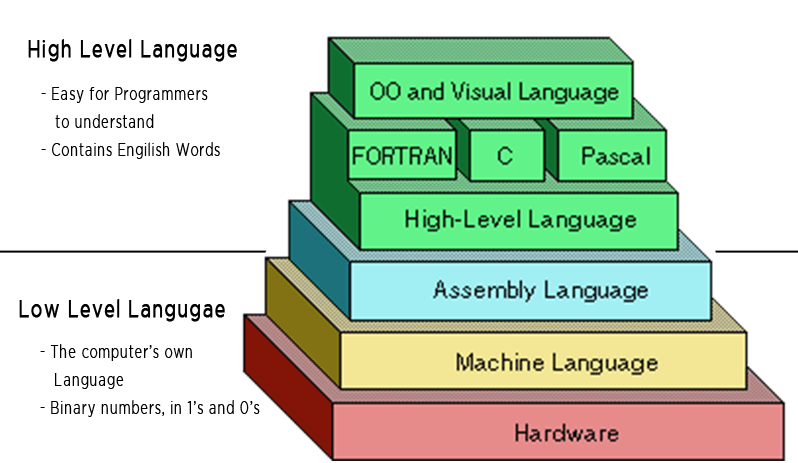
Ultimately, no matter what programming language you are using, it still runs on a computer, and if you don’t understand how it works, you will never be able to get the best out of it or know its limitations. This is where I had the idea that if I could build a computer, even a very simple one, from scratch, I would have a much better understanding of how computers work under the hood. In general, I have an understanding of how computers work from working with them, building them and doing a computer science degree, but if someone pointed a gun at my head and told me to build a computer from scratch, or at least show exactly how it should be built, as in designing the CPU, GPU, and all of the components, I know I wouldn’t be able to do it.
Obviously, it would be very hard to learn about how modern computers work, as each modern component is developed by teams of engineers, often in different companies that specialise in the development of that particular component; for example, AMD developing CPUs and Nvidia developing GPUs. I’m not really trying to understand all of the complexity and nuances of that level of modern computer hardware; it’s more about learning the principles of how computers work and having a basic idea of how to build one from scratch.
The reality is that even though most of us use computers in the form of a phone, PC, Laptop, console, or even a car(most cars have computers in them) daily and our whole lives depend on them, from bank accounts and transactions to medical records and even land registry data, most of us wouldn’t be able to create one from scratch; probably most people wouldn’t even be able to assemble one from parts. I have been building PCs since I was a teenager, mainly for gaming, so I can assemble a PC from parts, but it’s not the same as actually building a computer from scratch.
Initially, I wanted to create a simple computer from scratch that I could program in assembly and then eventually create a C-like language as a side project; this is where I discovered Turing Complete, a game that allows you to do just that. It’s not the same as building it in real life, but it seems close enough, as it would allow me to learn principles of how computers actually work, which is close enough.
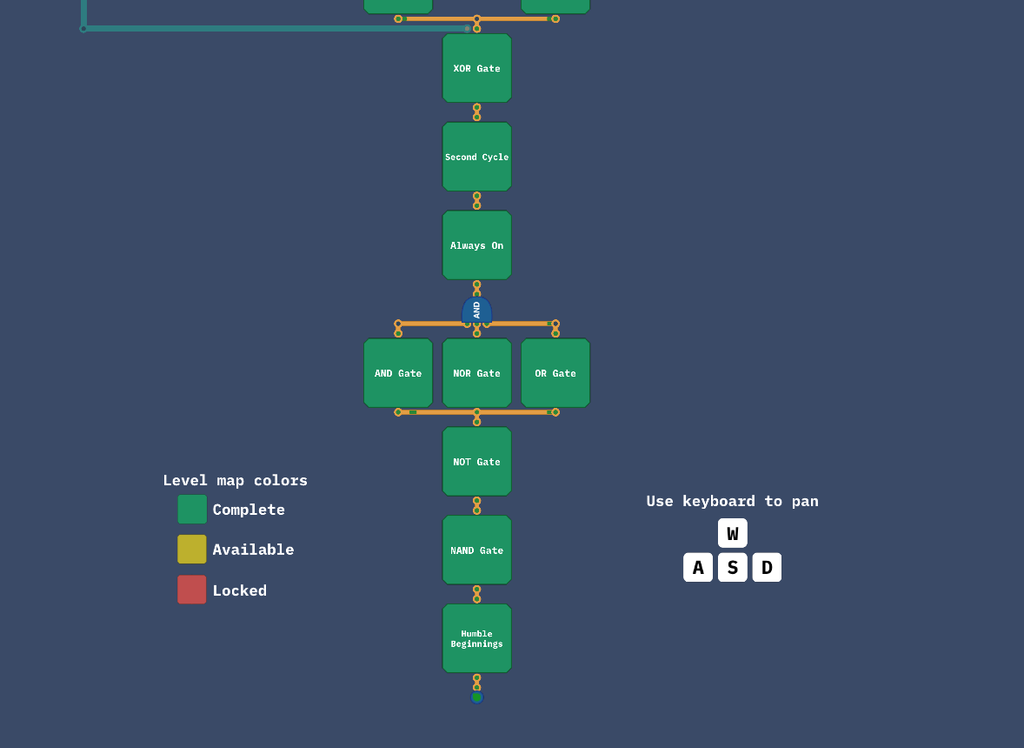
I have recently completed the full game and posted a walkthrough on my YouTube channel. The game first teaches you Boolean logic such as NAND, NOT, AND, NOR and others, then arithmetic and memory, stuff like Binary Racer, counting signals, half adder, full adder and many others. I particularly enjoyed the CPU Architecture levels and the Programming ones(even though I am not a fan of assembly).
Truth tables and the NAND gate
The game also introduces the concept of truth tables as the first and most fundamental part of it.
A truth table lists every possible combination of inputs and the output a circuit should give for each one. A wire can only be on or off, 1 or 0, so a gate with two inputs only has four combinations, and its whole behaviour fits in four rows. This is the NAND gate, one of the first and most fundamental gates that I had to build:
| A | B | A NAND B |
|---|---|---|
| 0 | 0 | 1 |
| 0 | 1 | 1 |
| 1 | 0 | 1 |
| 1 | 1 | 0 |
The output is only off when both inputs are on. It doesn’t sound like much, but NAND is a universal gate: every other logic gate, and in the end the whole computer, can be built from NANDs alone. A NOT gate is just a NAND with both inputs connected to the same wire, an AND is a NAND followed by a NOT, and OR, NOR, XOR, and the rest follow from there.
What I liked about the game’s approach is that the truth table becomes the specification. Each level tells you what the outputs should be; you build a circuit, and the game checks it against every combination, which is basically a unit test for hardware. Once a level is solved, that circuit becomes a component you can reuse in later levels, so you never build the same thing twice, and everything stacks on top of what came before.
From logic to maths and memory
Once you have logic gates, the next step is teaching circuits to count, and the truth tables show you how. A half adder adds two single bits:
| A | B | Sum | Carry |
|---|---|---|---|
| 0 | 0 | 0 | 0 |
| 0 | 1 | 1 | 0 |
| 1 | 0 | 1 | 0 |
| 1 | 1 | 0 | 1 |
The Sum column is exactly XOR, and the Carry column is exactly AND, so a half adder is just those two gates side by side. A full adder also takes a carry coming in from the bit before, and chaining eight of them lets you add two whole bytes. That chain becomes important later, because each adder has to wait for the carry from the one before it, and the waiting adds up.
Negative numbers use two’s complement, where the top bit of a byte is worth -128 instead of +128. To negate a number, you flip every bit and add one. The nice consequence is that subtraction doesn’t need any new hardware, because it’s just adding a negative number.
Memory is where time comes in. Up to this point, every circuit simply reacts to its inputs, but once you can delay a signal by one tick and feed it back into itself, a circuit can hold on to a value. From there, you build a register that stores a whole byte, a counter that adds one every tick, and decoders that turn a number into “which of these wires is on”, which is how a computer picks a register or an operation from an instruction. The ALU(Arithmetic Logic Unit) then combines the maths and logic into a single component that does whatever an instruction asks.
Building the CPU
The CPU Architecture levels are where everything comes together into an actual computer. The first one you build is called Overture: an 8-bit machine with six registers, where every instruction is a single byte. The top two bits of that byte decide what kind of instruction it is, whether that’s loading a value, doing a calculation, copying a value or jumping if a condition is true, and the remaining bits say which registers or operation to use. There’s even a level named after the game itself: once your computer can jump based on a condition, it is, in theory, Turing complete, meaning that given enough memory and time it can compute anything any other computer can.
After that, you build a much more capable computer called Symphony. It’s 32-bit, with 16 registers, including one that’s always zero, a stack pointer, and a flags register for comparisons, and it has proper memory you can load from and store to. Every instruction is four bytes long. If you watch older videos of the game, you’ll see a different architecture called LEG, which the 2.0 update replaced with Symphony.
Building it felt a lot like debugging at work, just with wires instead of code:
- A short circuit I couldn’t see. On the RAM level, an enable wire was joined to the memory address bus at a node hidden under another wire, so two parts were trying to drive the same wire at once.
- A missing wire, found with maths. On the I/O devices level, the game told me a register should hold 0x120 but held zero. 0x120 is 288, the test was on cycle 72, and every instruction is 4 bytes, so 72 × 4 = 288. The register was meant to receive the program counter, and the wire carrying it wasn’t connected.
- New instructions without new hardware. In the game, you write the specification for your own assembly language, so adding
mov,negandnotneeded no new hardware.movis an OR with the zero register,negis zero minus a number, andnotis a NOR with zero.
The biggest lesson was about performance. To unlock the final levels, the delay of my XOR, full adder, adder and ALU all had to be under set limits, and my ALU was stuck at 207 when it needed to be under 142. Clicking the delay counter highlights the slowest path through the circuit in red, which is basically a profiler for hardware. It turned out the bottleneck wasn’t the adder at all, but the comparison logic, which was built on my old and slow 8-bit less-than solution. Replacing an AND followed by a NOT with a single NAND in my XOR, and swapping two wires in my signed comparison, brought the ALU down from 207 to 139.
Programming my own computer
I’m not a fan of assembly, but writing it for a CPU I’d built myself was a different experience. Every instruction maps to something I wired up, so when a program goes wrong, I can see which part of the machine is involved.
The level that changed how I think about high-level code was Capitalise, where you capitalise the first letter of every word. In JavaScript, it’s one line:
const capitalised = text.replace(/(^|\s)\S/g, c => c.toUpperCase());In Turing Complete, there are no strings and no toUpperCase(). You get one character at a time, as a number. In ASCII, a lowercase “a” is 97 and a capital “A” is 65, so capitalising a letter is just subtracting 32, and a space also happens to be 32. That turns the whole problem into: if the previous character was a space, subtract 32 from this one.
mov r2, 32        ; pretend a space came first
loop:
in r1             ; read the next character
mov r3, r1
cmp r2, 32        ; was the previous character a space?
jne skip
sub r3, r1, 32    ; yes: make this one a capital
skip:
out r3
mov r2, r1        ; remember this character for next time
jmp loop
The if statement disappears completely: it becomes a compare, followed by a jump that skips over the code you don’t want to run.
The other programming levels taught me similar things:
- Nim, a card game against an AI, came down to two instructions: subtract 1 from the number of cards, then AND the result with 3. ANDing with 3 keeps the last two binary digits, which is the same as
% 4, so the program always leaves the AI with 1, 5 or 9 cards. - Delicious Order asks you to sort 16 numbers. Assembly has no arrays, so I stored the numbers in memory from address 1024 onwards, 4 bytes apart, and wrote a selection sort that worked out every address itself. An array index really is just a base address plus the index times the size of each element.
- Tower of Hanoi, the final level, is solved with recursion. Functions work because
callpushes a return address onto the stack andretpops it off again, so every nested call knows where to go back to. That’s exactly what a stack trace is showing you when something crashes.
What it taught me about high-level code
Going back to where I started, this is what I wanted from the game: to see what’s underneath the code I write every day(Codex/Claude writes a lot of it these days). A few things have stuck with me.
- Performance is about the slowest path. My ALU didn’t get any faster when I sped up the adder, which was the obvious suspect. It only got faster once I measured, found the real bottleneck in the comparison logic and fixed that, which is just as true for a web service as for a circuit.
- Memory is just numbers at addresses. Arrays, strings and stack frames are all conventions for how those numbers are laid out. C++ makes you manage that layout yourself, and JavaScript manages it for you, but it’s still there.
- A CPU only does a handful of things. It loads, stores, calculates, compares and jumps. Everything else, from
ifstatements to recursion, is built out of those.
Turing Complete isn’t the same as building a computer in real life, and it’s worth being honest about where it stops. Every component behaves perfectly: there’s no electrical noise, no power supply to worry about, and timing is measured in neat ticks rather than nanoseconds. Some big parts, like RAM, come as ready-made components rather than being built from gates. Real CPUs also do a lot that the game only touches on or leaves out, such as pipelining, caches and branch prediction.
If you want to see the whole journey, my full walkthrough of Turing Complete, you can find it on my YouTube channel. I had to cut some of it out, like checking hints and speed some of it up just to make sure that it fits into a single video, as YouTube has a strict 12h or 256gb limit, and my initial recording was 17h…
Leave a Reply